Icon of program: PDF Compressor

PDF Compressor for Windows

  • Trial version
  • 3.5
    154
  • 177.7K
  • V2021
Download for Windows

View an ad to download for free

Free software to compress PDF documents

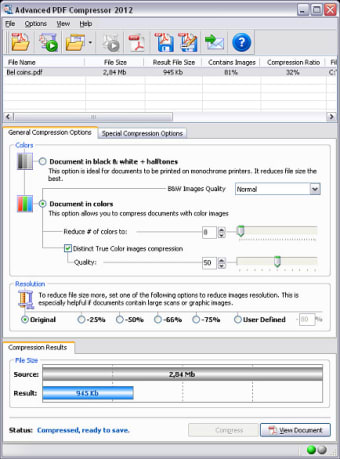
PDF Compressor is a quick and easy way to reduce the file size of a PDF document. This is useful, for there are many times when extremely complex documents can require a substantial amount of memory. Such a compressor is often used when transferring a PDF into a ZIP file format or when sending it to multiple recipients.

Top Recommended Alternative
Core Functions and Features

PDF Compressor has the ability to handle multiple files at the same time (known as 'batch processing'). It is also important to note here that this software package is able to convert common JPEG images into a PDF file format. This is done by selecting the 'Image to PDF' mode found within the main menu. Modifying a standard JPEG image is often required when this image needs to be placed into a PDF document. On a final note, it is also possible to combine multiple PDF files into a single package.

Additional Uses

Users can also choose to employ PDF Compressor as a command-line program. In other words, it can be completely automated and scheduled to perform specific tasks at predetermined times. This software package is supported by all modern versions of Windows and a free trial version is available before the entire bundle will need to be purchased.

  • Pros

    • It is very easy to work with this compressor.
    • Users can leverage all of its main functions while in trial mode.
  • Cons

    • The package will eventually have to be purchased.
    • It is not possible to convert the PDF files themselves.
 0/1

App specs

Also available in other platforms

Program available in other languages


Icon of program: PDF Compressor

PDF Compressor for PC

  • Trial version
  • 3.5
    154
  • 177.7K
  • V2021
Download for PC

View an ad to download for free


User reviews about PDF Compressor

3.5

2 reviews

Add review

Main reviews for you

  • Anonymous user

    Useless. Waste plz dont download. It will not alteast one trial copy too. Useless. plz prefer some other for Trial users.

  • Anonymous user

    The best PDF compressor I seen. Before I've found this utility, I tried a Free PDF compressor - it does not work at all, or makes corrupt PDF files.This software - Advanced PDF Compressor really works. I get very impressive PDF compression results. Pros: It really works. Easy to use. Affordable price.High PDF compression ratios.Has batch compressing mode to compress multiple PDF files. Cons: none.

More

You may also like

Alternatives to PDF Compressor

Explore Apps

Latest articles

Laws concerning the use of this software vary from country to country. We do not encourage or condone the use of this program if it is in violation of these laws.
Softonic

Is PDF Compressor safe?

99/100

Score result: Clean

This file passed a comprehensive security scan using VirusTotal technology. It is safe to download.

  • Virus free
  • Spyware free
  • Malware free
  • Verified by Security Partners

    VirusTotal logo

Scan Info

Last scan
Friday, January 5, 2024
Scan provider
VirusTotal · Full report

File Integrity

File
pdfcompressor-setup.exe
SHA256
a07ba86ae5a575a19bb5b8d052a0927096807a1bbb743955cd9063c162326d7c
SHA1
a24b588fe366c23cc7a2f2bf926addc45d9dd8b5

Softonic security commitment

PDF Compressor has been thoroughly scanned by our advanced security systems and verified by industry-leading partners. This file comes from the official developer and has passed all our security checks, showing no signs of viruses, malware, or spyware. For more information, visit our Security and Trust Center